
Synthetic Signals
Synthetic signals are evaluators Kelet runs on your sessions automatically. Each produces a signal (score + label + confidence) that feeds into RCA. No app code required.
Activate on day one. Before real user feedback accumulates, synthetic signals give Kelet enough data to start finding patterns.
Built-in templates
Section titled “Built-in templates”Kelet ships 15+ ready-made evaluators you can activate with one click. Each pre-fills the wizard so you can review and customize before saving. Examples: Task Completion, Hallucination Detection, Toxicity Detection, Sentiment Analysis, RAG Faithfulness, Loop Detection, Role Adherence, Tool Usage Efficiency, and more.
Go to Synthetic Evaluators → Templates tab for the current list. Click “Use Template” on any card to start.
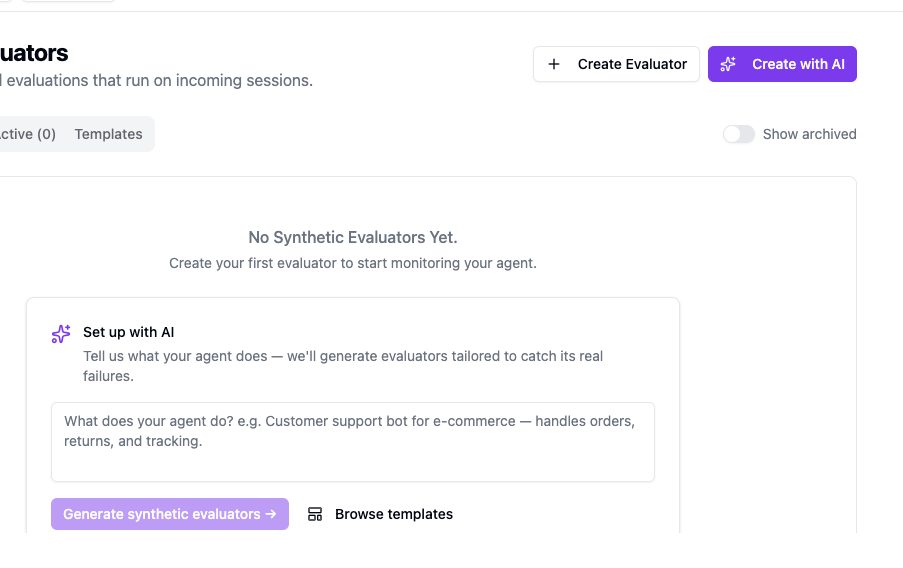
Create with AI (recommended)
Section titled “Create with AI (recommended)”Templates catch generic failure modes. Your agent has specific ones.
The “Create with AI” wizard reads your agent description and generates evaluators for the exact things your agent can get wrong — not a library pick-list, but a tailored set based on what your agent does and what “bad output” means for your use case. A customer support bot needs different evaluators than a code generation agent. Kelet figures that out and writes the configs.
- Go to Synthetic Evaluators → click “Create with AI” — opens the “Evaluator Building with AI” sheet
- Describe your agent: what it does, what failure looks like (e.g., “Customer support bot for e-commerce — handles orders, returns, and tracking”)
- Click “Generate synthetic evaluators →”
- Kelet shows a list of ideas — “Pick what matters” — check the ones that apply
- Click “Generate N signal(s) →” — Kelet writes the configs
- Review and adjust (“Looks good? Edit anything, then activate.”)
- Click “Activate N signal(s) →” — evaluators go live immediately
The AI coding skill generates a deeplink directly to this wizard. After running the skill, click the link it provides.
Create manually
Section titled “Create manually”-
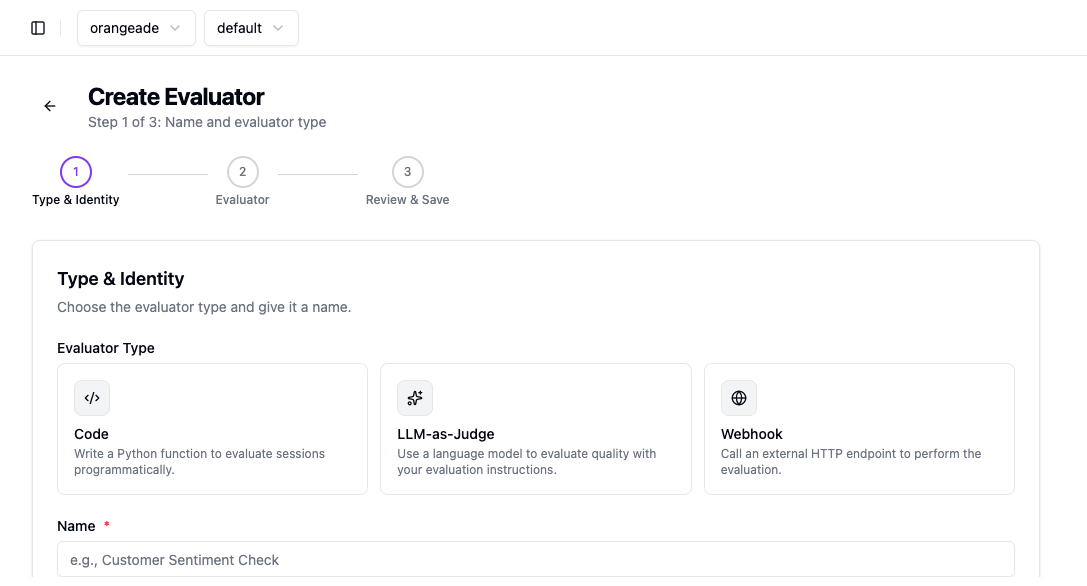
Go to Synthetic Evaluators → click ”+ Create Evaluator”
-
Step 1 — Type & Identity: Choose evaluator type (see below), give it a name and optional description
-
Step 2 — Evaluator: Write the evaluation logic. Optionally configure a Gate Condition (skip the evaluator unless a condition is met) and Post-Processing (transform the result before it’s saved)
-
Step 3 — Review & Save: Review config, optionally simulate on up to 5 recent sessions, then save
Evaluator types
Section titled “Evaluator types”LLM-as-Judge
Section titled “LLM-as-Judge”Write an evaluation prompt. Kelet injects the full session log — user messages, assistant responses, tool calls. Returns a score (0–1), label, and confidence.
Use for: semantic quality, tone, relevance, goal completion. When in doubt, use this type.
Write a Python function. Receives session metadata only — model, tokens, timing, tool definitions. Does not receive message content.
Use for: deterministic checks — too many turns, latency threshold, specific tool usage patterns.
Webhook
Section titled “Webhook”Call an external HTTP endpoint. You handle the evaluation logic.
Use for: custom infrastructure, compliance checks, reusing existing eval systems.
Choosing a type
Section titled “Choosing a type”| What you’re checking | Type |
|---|---|
| Did the agent answer the question correctly? | LLM-as-Judge |
| Did the agent use more than 10 tool calls? | Code |
| Is the response tone appropriate? | LLM-as-Judge |
| Did the session last longer than 30 seconds? | Code |
| Complex domain-specific logic | Webhook |
Next steps
Section titled “Next steps”- Signals concept — how signals feed into RCA
- Findings — what Kelet does with the data