
Findings
A Finding is not a single bad trace. It’s a recurring failure pattern across multiple sessions, with a root cause explanation and a proposed fix.
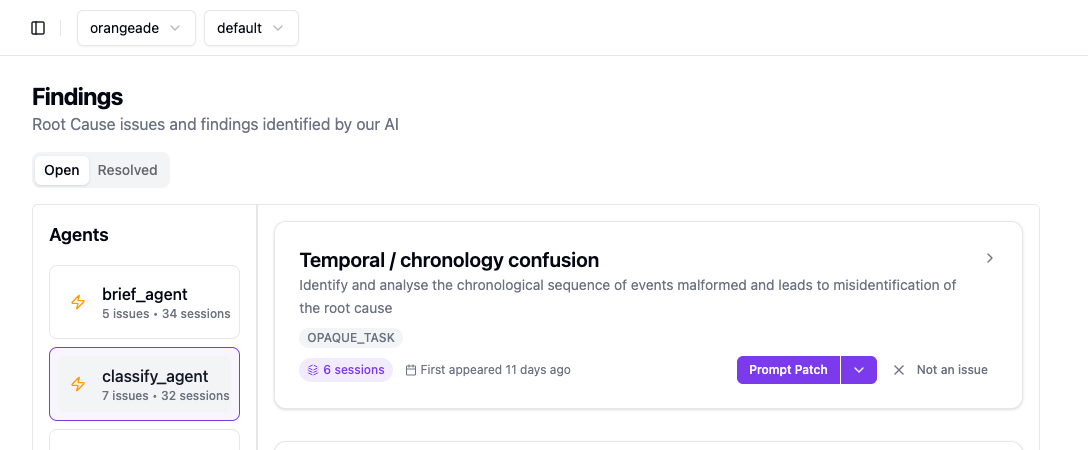
In the console, the Findings page groups by agent on the left. Select an agent to see its Findings on the right.
What a Finding contains
Section titled “What a Finding contains”| Field | Description |
|---|---|
| Title | Short name for the failure pattern, e.g., “Temporal / chronology confusion” |
| Description | One-sentence root cause, e.g., “Model focuses on incident type rather than liability context” |
| Tags | Failure category labels: missing_edge_cases, missing_context, vague_instructions, OPAQUE_TASK |
| Session count | How many sessions show this pattern. Higher = more impactful |
| First appeared | When Kelet first detected this pattern |
| Prompt Patch | Proposed change to your agent’s system prompt |
Prompt Patches
Section titled “Prompt Patches”A Prompt Patch is a fast, single-shot proposed edit to your agent’s system prompt that addresses the root cause. Generated immediately by an LLM from the Finding’s context.
Apply it as-is, customize it, or ignore it.
For a validated fix — one tested against your real session data using an evolutionary search — run GEPA Optimization from the dropdown. Slower, but comes with a measurable quality delta. See GEPA Optimization.
Actions
Section titled “Actions”Each Finding card has two action buttons:
- Prompt Patch (split button) — view and apply the suggested fix. The dropdown also exposes GEPA Optimization ( re-run the evolutionary process), Mark as Resolved, and future options (disabled for now).
- Not an issue — mark as false positive; removes the card from the Open view.
- Open — active Findings that haven’t been resolved or dismissed
- Resolved — Findings where the fix has been deployed
How to use Findings
Section titled “How to use Findings”- Go to Findings in the console
- Select your agent on the left
- Sort by session count — higher count = more impact
- Read the description — is this a real problem you recognize?
- Apply or dismiss
Findings improve over time as more sessions accumulate. A pattern seen in 3 sessions is a hint; a pattern seen in 50 sessions is a root cause.